How Does Workforce Automation Work in Lean Operations?
AI Summary
Workforce automation in lean operations is not just about removing manual tasks but about sequencing reliable processes before adding software, because faster errors can damage the business. A practical framework helps teams choose safe candidates, establish ownership, and scale without losing control.
- The five-point workflow qualification checklist for identifying deterministic, high-volume, data-ready processes.
- The architecture rules for APIs, portable logic, field-level ownership, GDPR safeguards, and vendor exit plans.
- The pilot-to-scale sequence using parallel testing, human review queues, and KPI gates for cycle time, accuracy, and uptime.
For lean teams comparing automation options while protecting daily operations, customer data, and limited implementation capacity.
Buying software is easy, but wiring a repeatable business process across disconnected tools without breaking daily operations is where execution stalls. When you evaluate how to automate tasks across your workforce, the central choice is not which platform has the longest feature list. The decision hangs on whether you standardize process logic, data ownership, and compliance boundaries before you write a single rule, or whether you bolt new triggers onto unstandardized workflows and accelerate existing errors.
Operational Leverage through Process Sequence Over Software
Operational leverage comes from connecting existing systems to execute repeatable processes from start to finish, rather than accumulating isolated point solutions. Many teams equate purchasing DIY tools or subscribing to generic AI writing apps with having an operational strategy. Adding more software without a defined execution sequence only fragments your data across more tabs.
True leverage requires treating automation as an engineering discipline rather than a software shopping trip. In data from over 300,000 U.S. firms in the 2019 Annual Business Survey, the use of advanced automation technologies is associated with a 11.4% higher labor productivity, which accounts for 20-30% of the difference in labor productivity between large firms and the median firm in an industry [1]. That gap is not closed by buying licenses alone. It is closed by how workflows are sequenced, validated, and connected to a central system of record.
Before comparing vendors, establish the structural principles that separate durable systems from fragile scripts:
- Process first, tooling second. A broken manual workflow becomes a faster broken workflow when automated.
- Single system of record. Every automated action must read from and write to a designated primary database, such as your central CRM or ERP.
- Explicit exception paths. Scripts must know when to stop and route an edge case to a person rather than guessing.
- Portable logic. Your business rules should be documented outside the software so you can rebuild them if a vendor changes pricing tiers.
Qualifying Repeatable Processes for Quick Wins
Your first implementation target determines whether your system delivers quick wins or creates an immediate maintenance burden. If you pick a process that relies on subjective judgment, inconsistent emails, or shifting spreadsheets, your scripts will break on the first exception.
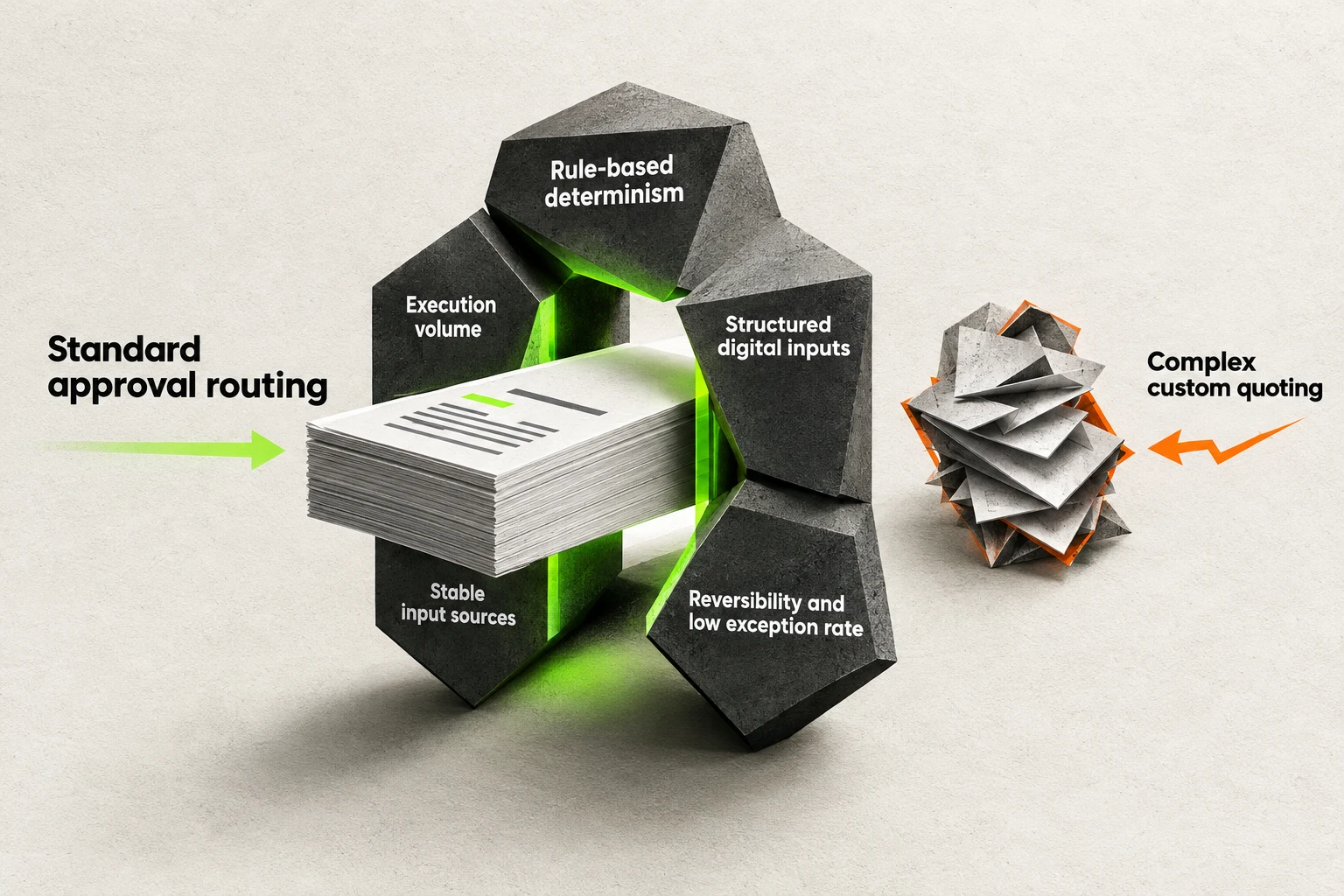
A workflow candidate is screened by five repeatability and data-readiness criteria.
You need a strict filter to score and select your initial workflow. In a systematic literature review synthesizing 83 peer-reviewed journal articles published between 2015 and 2025, Sommai Khantong and Pankom Sriboonlue find that suitable process candidates for automation should be rule-based and deterministic, executed at high volume, involve structured and digitally accessible data, have stable input sources, and require low cognitive judgment, while poor process selection is consistently identified as a leading cause of RPA project failure and automating a poorly designed process accelerates rather than remedies its deficiencies [2].
Run every candidate workflow through this five-point qualification checklist before building:
- Rule-based determinism. Every step follows unambiguous "if-then" logic with zero room for interpretation.
- Execution volume. The task runs frequently enough that eliminating manual steps returns immediate operational capacity.
- Structured digital inputs. Data arrives in consistent fields, such as validated web forms or API payloads, rather than free-text documents.
- Stable input sources. The upstream forms, databases, and interfaces feeding the workflow are not undergoing active redesign.
- Reversibility and low exception rate. If a script misfires, the action can be rolled back cleanly without corrupting customer records or external communications.
Standard approval routing, invoice data matching, and structured CRM lead assignment pass all five checks. Complex custom quoting does not.
Technical Pre-Work for Mapping Workflows and Baselines
Never build an automation directly inside a tool's visual canvas without mapping the lifecycle on paper first. Visual builders tempt you to wire triggers and actions together on the fly, which hides missing handoffs and unspoken manual checks until live data starts failing.
Technical pre-work means decomposing a task into its exact anatomy and measuring how it performs today. If you do not capture your manual baseline, you cannot verify whether the automated system actually improved speed or accuracy. In their four-phase SME workflow automation framework, Sokol Shurdhi, Eglantina Zyka, and Luan Bekteshi advise mapping and time-stamping every step of the lifecycle to establish a baseline performance measurement before technology selection, operating the Phase 3 pilot in parallel with existing manual processes rather than replacing them on day one, and gating Phase 4 scaling on explicit KPIs, namely cycle time, pick-up success rate, detection accuracy, and system uptime, while linking execution to existing WMS and ERP systems through bi-directional APIs so inventory does not drift between the floor and the system of record [3].
Complete these four documentation steps before selecting or configuring any software:
- Define the exact trigger. Specify the single database event, webhook, or schedule that initiates the sequence.
- List sequential actions and field transformations. Write down every field that gets read, formatted, calculated, or updated at each step.
- Map system handoffs and exception queues. Identify where data crosses between applications and where failed records will wait for human review.
- Record baseline cycle time and error rates. Time-stamp how long the manual process takes from trigger to completion and log how often manual data entry requires correction.
Tool Selection Criteria to Avoid Vendor Lock-In
When selecting tools, evaluate how easily you can extract your data and rebuild your logic elsewhere. Software directories encourage buyers to compare surface features, interface templates, and initial subscription tiers. They rarely warn you about what happens when task-tier pricing spikes or a proprietary connector breaks.

Tool layers connect around portable logic, with API access and exportability made visible.
Your architecture typically combines three layers: native automations built inside your core applications, API workflow layers that pass payloads between tools, and user-interface scripts for legacy software lacking APIs. Always prioritize native integrations and direct APIs over interface scraping, which breaks whenever a vendor updates a screen layout.
Protecting your operation from vendor lock-in requires checking interoperability standards before signing an agreement. Providing context from a survey of 114 UK enterprise and SME participants analyzing vendor lock-in in cloud and SaaS adoption (where 52% of surveyed organizations had already adopted cloud-based CRM), Justice Opara-Martins, Reza Sahandi, and Feng Tian found that 71% of participants claimed vendor lock-in risks would deter their organizations from adopting more cloud services, 47.7% encountered a lack of integration points between existing management tools, 76.6% were unsure of relevant standards supporting interoperability and data portability, and respondents identified making well-informed decisions before selecting vendors or signing contracts (66.4%), continuous competition between providers (52.3%), and using standard software components with industry-proven interfaces (39.3%) as top mitigation strategies [4].
Apply these architectural checks to every tool on your shortlist:
- Standard REST APIs and webhooks. Verify that the platform supports standard HTTP webhooks and REST endpoints rather than forcing you into proprietary connectors.
- Clean data exportability. Confirm that all historical logs, customer records, and lookup tables can be exported on demand in standard formats like JSON or CSV.
- Modular workflow logic. Keep your core data transformation rules documented and modular so a single monolithic vendor does not hold your operational logic hostage.
- Pre-contract exit plan. Write down the exact steps, time required, and target destination for migrating your workflows out of the tool before you pay for an annual plan.
CRM Integration Architecture and GDPR Compliance Guardrails
Your CRM and ERP are the operational spine of your business. Connecting external automation tools to your CRM without strict field-level governance causes silent data corruption, infinite update loops, and regulatory exposure.
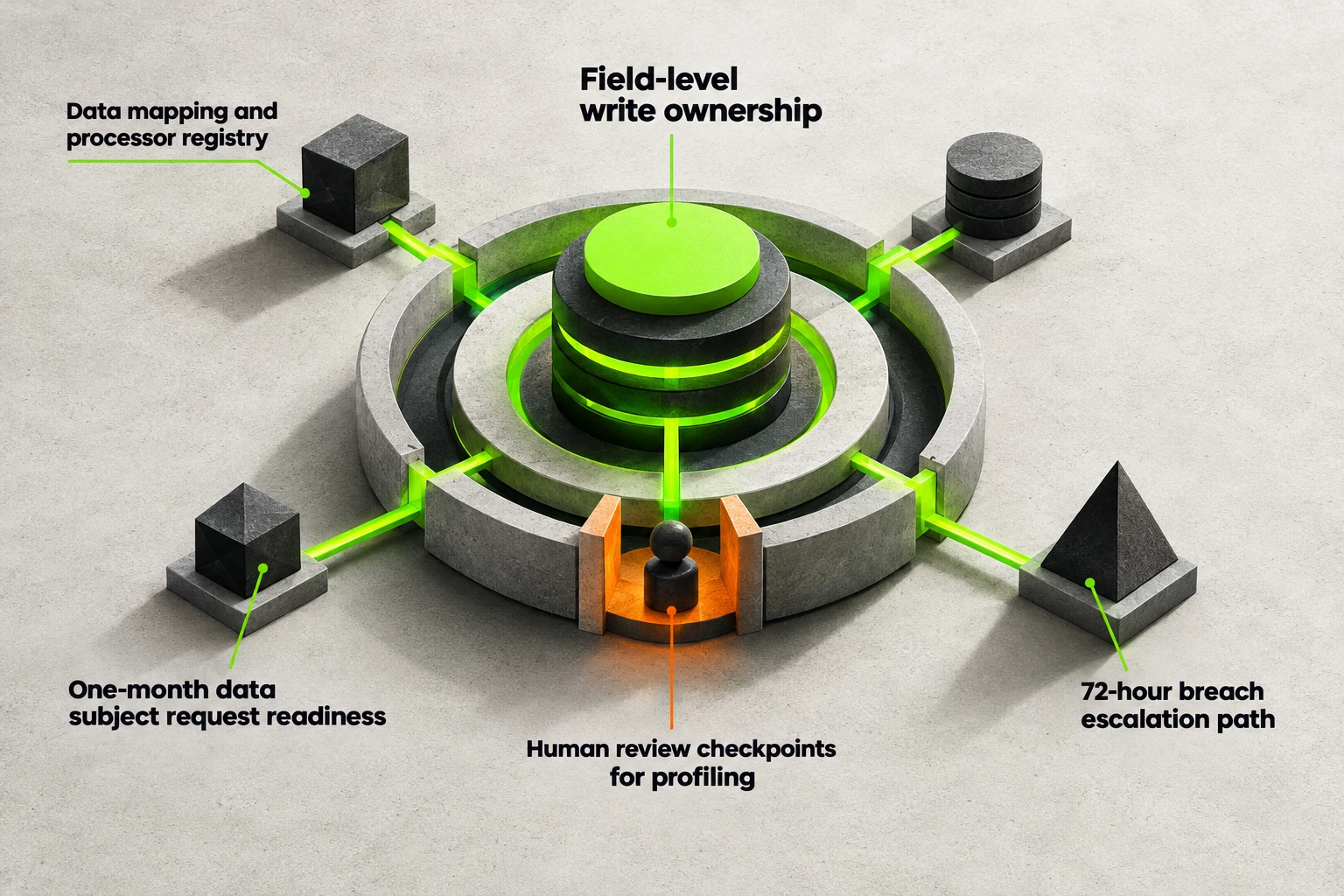
CRM field ownership sits within data safeguards, breach escalation, and human review controls.
The first rule of CRM integration is establishing field-level system-of-record ownership. If your CRM and your invoicing tool both have permission to overwrite a customer's billing status via bi-directional sync, a delayed webhook can overwrite a paid status with an unpaid status. Assign a single owner for every data field: one system holds write authority, and connected tools only read that field or submit structured update requests through a controlled queue. Scope every API key to least-privilege permissions so an integration only accesses the exact objects it needs.
Every automated pipeline that touches personal data must also enforce GDPR guardrails by design. Providing regulatory context, according to the GDPR checklist published by GDPR.eu (co-funded by the EU Horizon 2020 Framework Programme), organizations with at least 250 employees or those conducting higher-risk data processing must keep an up-to-date list of processing activities, and organizations with fewer than 250 employees should also conduct an assessment, documenting processing purposes, data categories, internal and third-party access, encryption, and erasure plans, while controllers must notify supervisory authorities within 72 hours of a personal data breach and comply with data-subject requests to access, update, erase, restrict, or port personal data in a commonly readable format within a month [5].
Before turning on any integration that processes personal data, verify these compliance and architectural guardrails:
- Field-level write ownership. Document which platform is the single source of truth for each CRM field to prevent bi-directional sync drift.
- Data mapping and processor registry. Log every connected automation tool, the specific data categories it receives, its encryption standards, and when temporary payload logs are erased.
- One-month data subject request readiness. Ensure your automated pipelines can locate, export in a commonly readable format, or purge a contact's data across all connected tools within the one-month legal window.
- 72-hour breach escalation path. Configure automated webhook failure alerts and access logs so unauthorized data exposure is detected and escalated within the 72-hour notification deadline.
- Human review checkpoints for profiling. Pause automated sequences before any high-stakes customer or applicant decision is finalized so a person reviews the record.
The Controlled Implementation Sequence from Pilot to Scale
Deploying an automated workflow is not a flip-the-switch event. Rushing multiple workflows into production at once overwhelms your ability to spot edge cases and fix broken API payloads.

A parallel pilot compares the automated workflow with manual work before scaling.
Discipline in pacing and human oversight separates stable deployments from abandoned experiments. In a systematic literature review of 34 articles on Robotic Process Automation implementation, Duc-Minh-Quan Huynh and Ida Lindgren identify 12 organizational challenges and derive 7 sequential technical, organizational, and strategic conditions across pre-implementation and implementation phases, reporting that challenges in achieving stakeholder alignment have been key factors in the failure of 30–50% of RPA implementations and noting literature recommendations to keep humans in the loop, such as automating 70% of tasks while 30% involve human interaction, and to precede full-scale realization with an initial proof of concept and pilot stage [6].
Execute your rollout using this controlled four-step sequence:
- Pace initial builds. Automate one process at a time so you can stabilize its data mappings and error logs before introducing new variables.
- Enforce a human-in-the-loop split. Let deterministic rules handle routine execution while routing edge cases, missing fields, and high-value approvals to a designated human queue.
- Run a parallel pilot. Operate the new automated workflow alongside your existing manual process on live inputs without turning off the manual steps on day one.
- Gate scaling on baseline KPIs. Compare the pilot's cycle time, accuracy, and uptime against your pre-automation baseline. Only retire the manual process once the automated workflow meets your verified thresholds.
Once you have weighed process readiness against integration risk, your immediate next step is to audit three candidate workflows against the five-point qualification checklist and time-stamp the manual steps of the top scorer for five consecutive workdays to establish your baseline.
Frequently Asked Questions
What is the primary business outcome reviewers cite from business process automation, and how long is the median payback period?
In G2's analysis of the Business Process Management category, 52.3% of reviewers who mention automation cite time savings or manual task elimination as the primary business outcome, and the category median payback period in G2's Fall 2026 Grid Report is 14 months [7]. In that same G2 dataset, 117 of 591 reviewers who mention automation cite approval workflows as a primary use case or direct business benefit, and the category average user adoption rate is 59% [7]. Selecting high-volume approval workflows and verifying adoption during a pilot helps keep payback on track.
Why do initial robotic process automation implementations fail, and how fast should a small or medium-sized enterprise roll them out?
Up to 50% of initial RPA implementations are estimated to fail because expert knowledge is necessary to create reliable and scalable software robots that offer business value, as noted by Lukas-Valentin Herm, Christian Janiesch, and colleagues [8]. Based on 35 literature use cases, eight expert interviews, and five company workshops, the researchers structure implementation into initialization, implementation, and scaling phases, recommending automating not more than one process per month in the beginning [8]. They also advise small and medium-sized enterprises to consider making available at least one full-time equivalent to manage RPA knowledge and chaperon projects [8].
Does the GDPR allow fully automated decision-making for workflows that significantly affect individuals?
No, under Article 22 of the GDPR, data subjects have the right not to be subject to a decision based solely on automated processing, including profiling, which produces legal effects or similarly significantly affects them [9]. Where such automated decision-making is permitted for contract performance or by explicit consent, the data controller must implement suitable safeguards [9]. These mandatory safeguards include at least the right to obtain human intervention, to express a point of view, and to contest the decision [9].
Sources:
- National Bureau of Economic Research - U.S. Census Bureau firm-level data on automation and labor productivity
- Technologies / MDPI - Systematic literature review of 83 articles on process selection criteria
- Computers / MDPI - Four-phase SME workflow automation framework and KPI gating criteria
- Journal of Cloud Computing / SpringerOpen - Empirical survey on cloud and SaaS vendor lock-in mitigation
- GDPR.eu - Regulatory compliance checklist for data mapping, breach notices, and data rights
- Information Systems and e-Business Management - Systematic review of RPA implementation conditions and human-in-the-loop ratios
- G2 - Business Process Management Grid Report benchmarks on adoption and payback
- Information Systems and e-Business Management - Research on RPA implementation phases, failure estimates, and SME rollout pacing
- GDPR.eu - Legal requirements and human intervention safeguards under GDPR Article 22