Which Examples of Agentic Workflows Fit Your Business?
AI Summary
Choosing examples of agentic workflows for an SMB is not about automating everything—it is about finding the handoff-heavy process where context, judgment, and controls matter most. The article shows how autonomous execution can connect systems while keeping people responsible for risky decisions.
- How lead enrichment, proposal drafting, billing triage, invoice reconciliation, and scheduling workflows move context across CRM, finance, service, and planning tools.
- Why hybrid execution assigns stable steps to rules, variable analysis to agents, and sensitive approvals to humans.
- How to select a first high-ROI pilot using effort, variability, handoffs, approval thresholds, least-privilege access, and open standards such as MCP.
For SMB teams buried in repeatable manual work and unsure where autonomous workflows can deliver safe, measurable value.
Growing a business past the initial revenue milestones creates a very specific kind of operational drag. You have repeatable processes that keep the lights on, yet your calendar is buried under manual handoffs, copying data between disconnected tools, and reviewing routine work. When you look for examples of agentic workflows to solve this overload, you usually run into two dead ends: developer tutorials full of code or enterprise showcases that assume you have an internal engineering department.
Your decision on which processes to automate first does not hang on buying the flashiest AI tool. It hangs on separating rigid, single-step tasks from composite, multi-step processes where an autonomous system can gather context across your tools, handle variable inputs, and pause at a human checkpoint before taking high-stakes action.
Why Lean SMBs Need Multi-Step Autonomous Execution Instead of Isolated Task Automation
Standard rule-based automation works like a train track. If a customer fills out a specific form field, a rule copies that row into a spreadsheet. The moment a prospect sends an unstructured email, attaches a messy document, or asks a question that crosses between sales and billing, the rule breaks and the work lands back on a human desk.
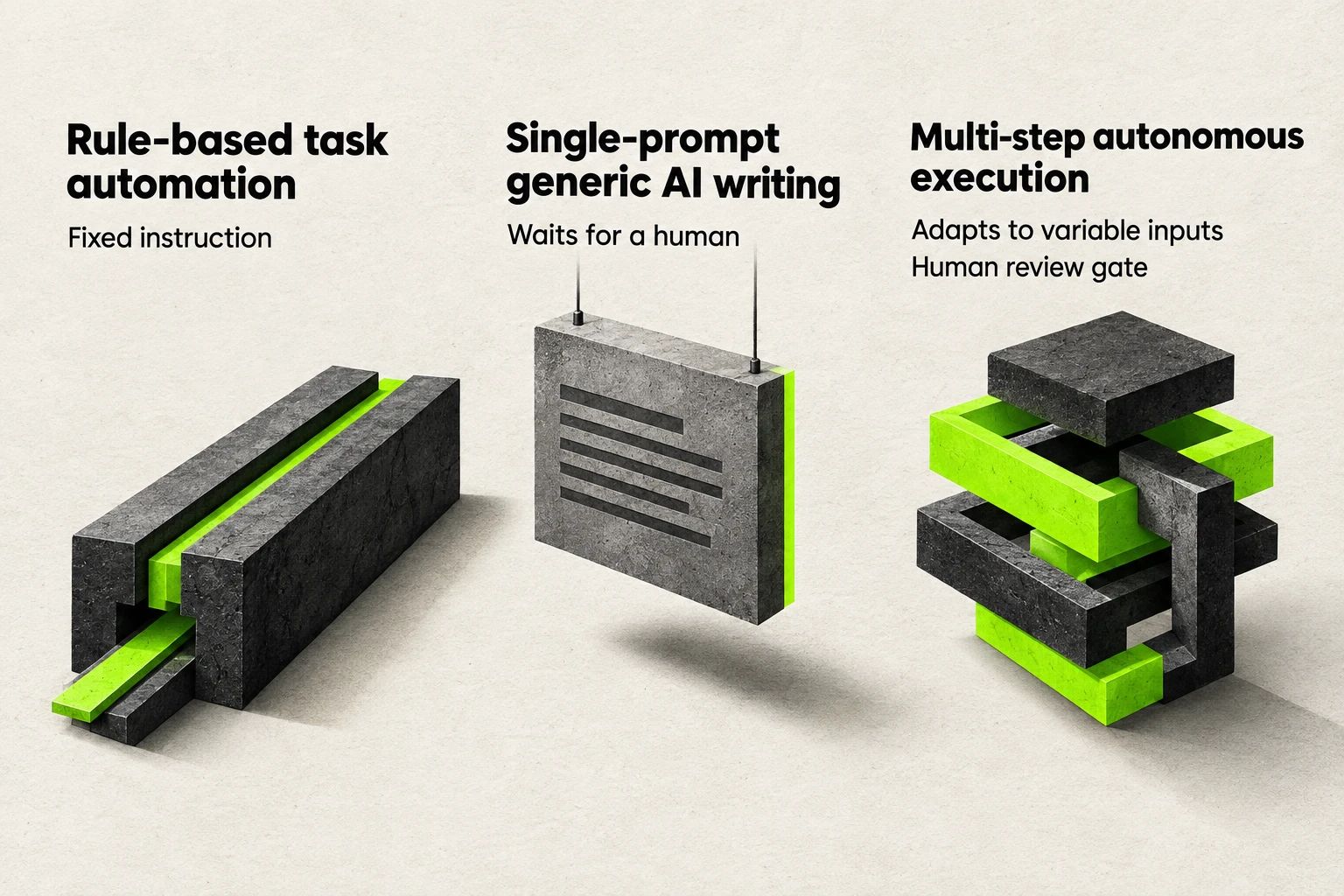
A comparison of fixed-rule automation, prompted writing, and multi-step execution.
Operational overload rarely comes from a single isolated task. It comes from the glue work between tools: checking one system, interpreting what the data means, updating a CRM record, and drafting a response. John Roese, global chief technology officer and chief AI officer at Dell Technologies, states that while first-generation AI tools like chatbots and coding assistants handle single-dimensional processes well, agents are the better tool for composite processes that span multiple domains, such as quoting or end-to-end remediation of a customer issue across entitlements, billing, and logistics, because agents can pass context between each other and reason across boundaries [1].
Instead of automating one click at a time, evaluate how work moves across your business using three operational distinctions:
- Rule-based task automation executes a fixed instruction when a predictable trigger occurs, such as moving a form submission into a CRM field.
- Single-prompt generic AI writing generates text or summarizes a document when you ask it to, but waits for a human to copy, verify, and move that output into the next system.
- Multi-step autonomous execution takes an operational goal, pulls context from several systems, adapts to variable inputs, and coordinates the handoffs until it reaches a human review gate.
If you feel behind because your workflows are still manual, the broader market context shows that production maturity is still rare. As context from Deloitte's 2025 Emerging Technology Trends study notes, while 30% of surveyed organizations are exploring agentic options and 38% are piloting solutions, only 14% have solutions ready to be deployed and 11% are actively using these systems in production, while 42% are still developing their agentic strategy road map and 35% have no formal strategy at all [1]. Moving one composite workflow into production puts your operation ahead of teams stuck running disconnected experiments.
Sales and CRM Integration Examples for Real-Time Lead Enrichment, Scoring, and Account Preparation
Sales pipelines stall when inbound leads sit unworked while someone manually researches company details, checks past interactions, and updates CRM fields. In a lean operation, every hour spent cross-referencing prospect data or assembling routine account briefs is an hour taken away from closing deals.
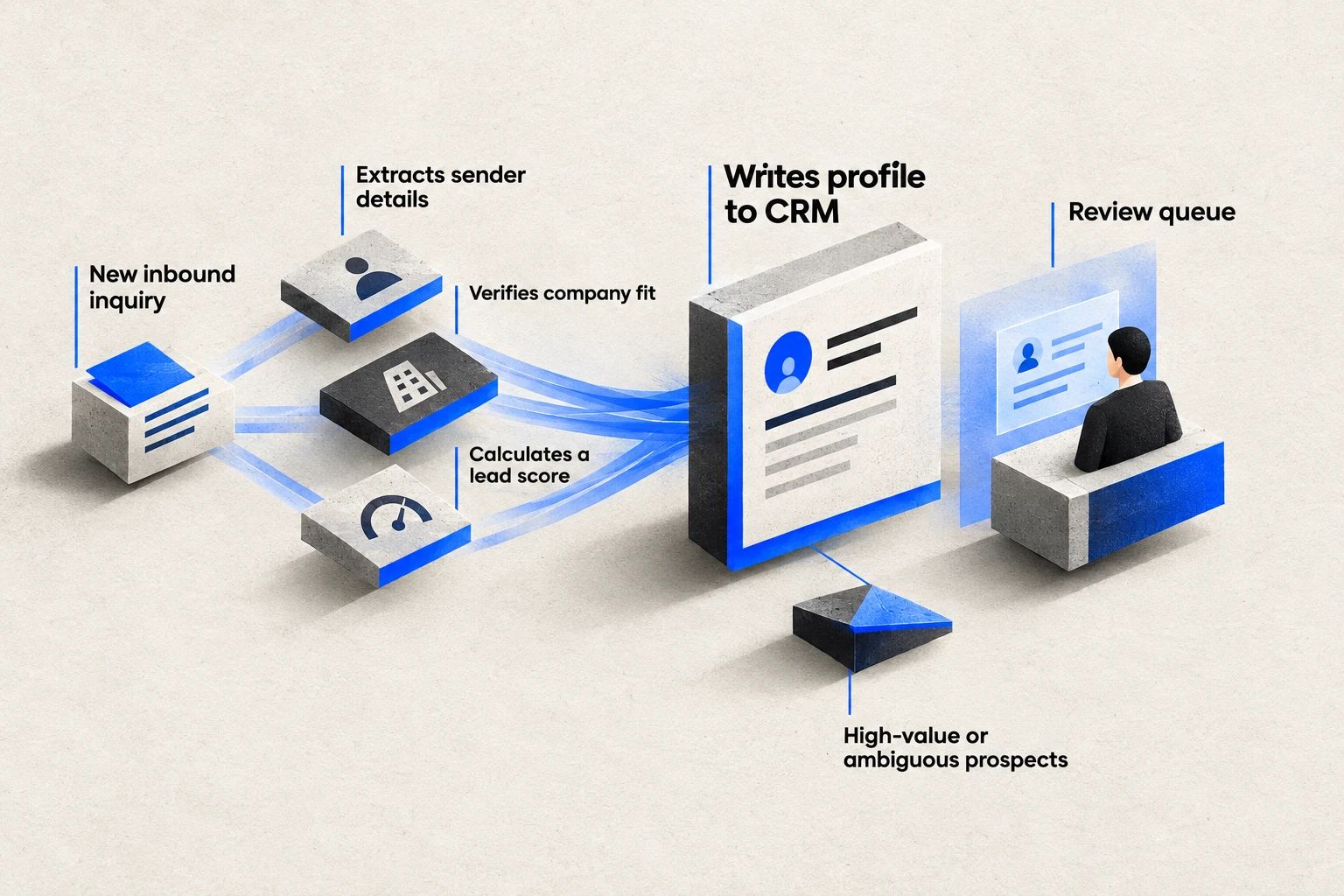
Lead details converge into a CRM record, with ambiguous prospects sent to review.
When you apply multi-step autonomous execution to sales and CRM integration, the system takes over the research and preparation loop before a salesperson ever opens the record.
Inbound Lead Enrichment and Lead Scoring Workflow
- Trigger and repeatable process: A new inbound inquiry arrives through a web form, email, or booking link with incomplete company information.
- Autonomous multi-step execution: One specialized component extracts the sender details, a second queries external business data and internal history to verify company fit, and a third calculates a lead score and drafts a tailored discovery brief.
- CRM integration: The workflow writes the enriched profile, qualification notes, and score directly into the CRM contact and deal records.
- Human checkpoint: Standard qualified leads trigger an automated calendar invite, while high-value or ambiguous prospects pause in a review queue for a salesperson to approve the outreach angle.
Account Preparation and Proposal Drafting Workflow
- Trigger and repeatable process: A qualified prospect books a consultation or requests a formal quote across multiple service tiers.
- Autonomous multi-step execution: The system pulls historical call notes, past purchase records, and current pricing rules to assemble a structured account briefing and an initial proposal draft.
- CRM integration: The draft proposal and pricing breakdown attach directly to the active opportunity record inside the CRM.
- Human checkpoint: The account owner reviews the commercial terms, adjusts custom discounts, and approves the document before anything reaches the prospect.
Marketing and Demand Generation Examples for Autonomous Research, Campaign Coordination, and Brief Creation
Marketing bottlenecks rarely happen during final creative review. They happen during the preparation phase: gathering competitor positioning, checking search intent, aligning editorial calendars, and turning scattered notes into structured campaign briefs.
Treating AI writing as an SEO or demand generation strategy fails because isolated text generation ignores search intent, competitive gaps, and authority signals. A functional workflow treats research, outlining, and coordination as connected steps where specialized components pass verified context forward. Teams integrating AI into human workflows get the strongest return when autonomous systems handle the research and structural preparation while humans control final editorial judgment.
Competitor Research and Campaign Brief Workflow
- Trigger and repeatable process: A new product launch, seasonal promotion, or target topic enters the marketing roadmap.
- Autonomous multi-step execution: A research component collects current SERP patterns and competitor angles, an analysis component maps audience questions against internal product capabilities, and a planning component compiles a complete campaign brief with channel schedules.
- System integration: The workflow pulls performance data from analytics tools and deposits the structured brief and task list directly into the project management workspace.
- Human checkpoint: The marketing lead reviews the strategic angle and approves the AI content outline strategy before any copy is produced or scheduled.
Multi-Channel Asset Coordination Workflow
- Trigger and repeatable process: A core pillar asset or case study is approved for distribution across email and social channels.
- Autonomous multi-step execution: Specialized components adapt the core narrative into channel-specific drafts, check brand terminology rules, and align publication dates against the master calendar.
- System integration: Draft assets and scheduling metadata sync with the email marketing platform and content calendar.
- Human checkpoint: A human editor conducts a final quality check and triggers the live publication schedule.
Building a repeatable growth loops AI system in marketing means letting autonomous workflows compress the days spent on research and brief assembly into a structured preparation pipeline.
Customer Support, Claims, and Service Triage Examples for Resolving Routine Inquiries and Escalating Risk
Customer service teams drown when every incoming ticket requires a human to open three tabs just to figure out what happened. At the same time, handing customer communication entirely over to an unsupervised bot creates immediate brand and financial risk.
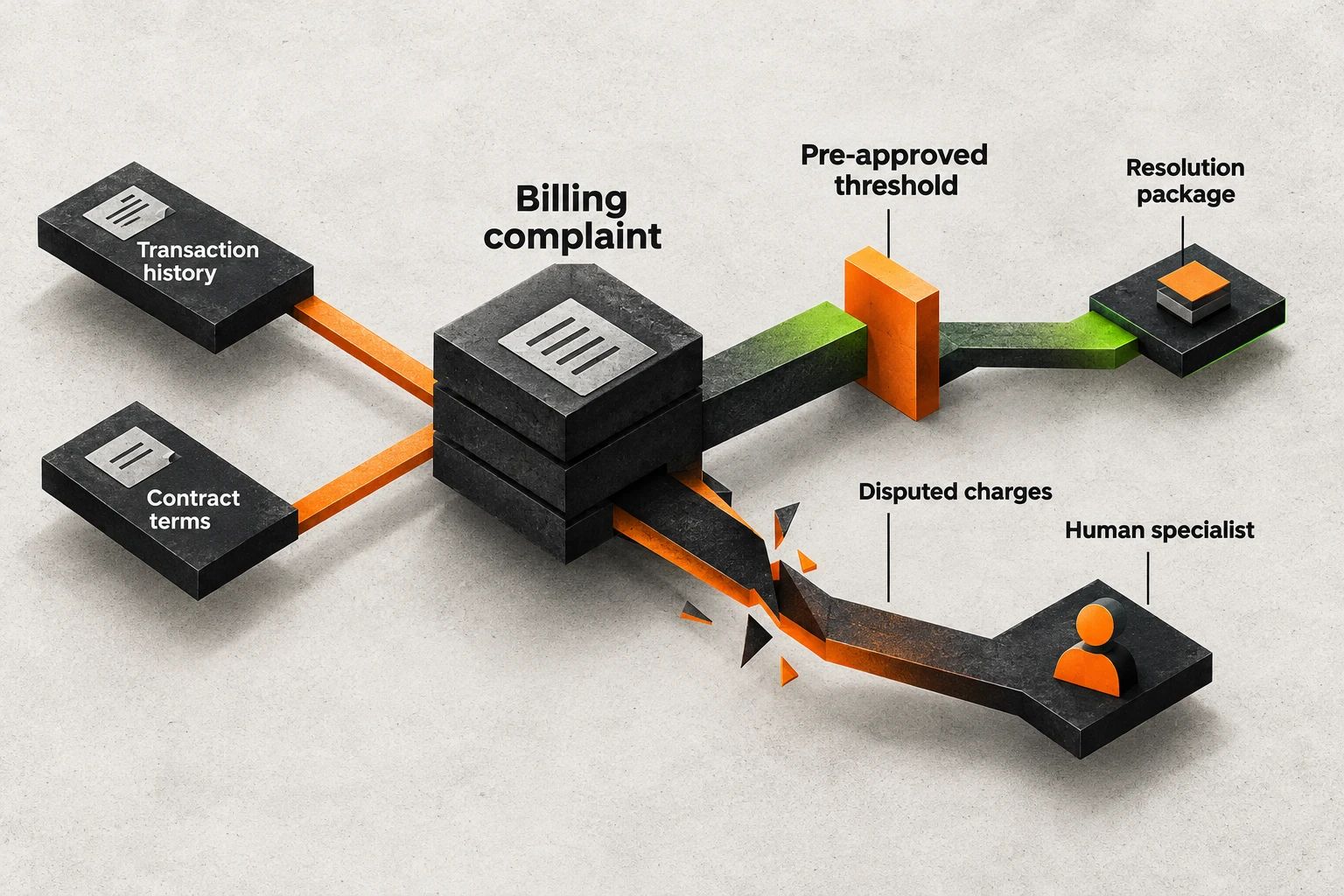
Billing context separates routine adjustments from disputed charges needing a specialist.
The operational fix is separating context gathering and routine triage from sensitive communication. At insurance company Mapfre, AI agents handle routine administrative tasks in claims management such as damage assessments while a person is always in the loop for sensitive tasks like customer communication; Group Chief Data Officer Maribel Solanas Gonzalez describes the approach as "hybrid by design," noting that anything carrying risk still goes through a human worker [1].
Customer Billing Inquiry and Triage Workflow
- Trigger and repeatable process: A customer submits a billing complaint, refund request, or service discrepancy ticket.
- Autonomous multi-step execution: The workflow classifies the request, pulls the customer's transaction history and contract terms, diagnoses the source of the billing mismatch, and prepares a resolution package.
- System integration: The system reads across the help-desk platform, billing software, and CRM account log.
- Human checkpoint: Routine adjustments within a pre-approved threshold are prepared for one-click execution, while disputed charges or sensitive complaints route to a human specialist with the full transaction timeline already attached.
- Operational benchmark: FTI Consulting's assessment of 57 workflow software providers notes that enterprise workflows will remain hybrid, allocating deterministic automation to stable work, AI agents to variable work, and humans to decisions requiring higher-order judgment when material, regulated, or ambiguous, and illustrates how agentic workflows dynamically adapt execution across invoice exception handling, customer service billing complaints, and employee onboarding [2].
Administrative Assessment and Escalation Workflow
- Trigger and repeatable process: A client submits a structured claim, warranty request, or service issue with supporting documentation.
- Autonomous multi-step execution: An intake component extracts the claim details, verifies coverage against active entitlements, completes the initial administrative assessment, and drafts the internal case summary.
- System integration: Case files and verification statuses update inside the core service management system.
- Human checkpoint: A human handler reviews the assessment and manages all direct communication with the customer when the case carries financial or relationship risk [1].
Finance and Back-Office Operations Examples for Order-to-Cash, Invoice Exceptions, and Accounting Controls
Back-office overload hides in the reconciliation gaps between sales orders, fulfillment logs, and accounting ledgers. When an invoice does not match a purchase order, or when a journal entry needs supporting documentation, someone has to hunt through emails and spreadsheets to reconcile the difference.
In finance, autonomous execution must never mean unrestricted authority to move money or alter ledgers. Instead, the workflow acts as an always-on reconciliation analyst that gathers the paperwork, flags the exact mismatch, and stages the entry for human sign-off.
Invoice Exception and Reconciliation Workflow
- Trigger and repeatable process: An incoming supplier invoice or customer payment fails to match the corresponding purchase order or delivery receipt.
- Autonomous multi-step execution: The system retrieves the original contract, order log, and shipping confirmation, identifies whether the discrepancy stems from a pricing error, quantity change, or tax calculation, and drafts the resolution steps.
- ERP and accounting integration: The workflow cross-references records between the CRM, inventory log, and accounting platform without overwriting posted entries.
- Human checkpoint: Exceptions within strict tolerance rules are staged for batch confirmation, while material discrepancies route to finance leadership with the side-by-side evidence attached [2].
Journal Entry Preparation and Collections Follow-Up Workflow
- Trigger and repeatable process: A billing milestone is reached or an accounts receivable invoice passes its due date.
- Autonomous multi-step execution: The system compiles the supporting transaction data, prepares the draft journal entry or tailored payment reminder, and checks account status for open service disputes.
- Accounting integration: Draft entries and communication logs sit in the accounting and CRM staging queue.
- Human checkpoint: Dollar thresholds and role-based access rules require a human controller or account manager to review, approve, and post the entry or send the notice.
Multi-Step Operations and Scheduling Examples for Lean SMEs from Email Ingestion to Resource Allocation
You do not need an enterprise IT department to run multi-step workflows across daily operations. Many established small and medium-sized businesses run their core scheduling, supplier coordination, and resource planning out of shared email inboxes and spreadsheets.
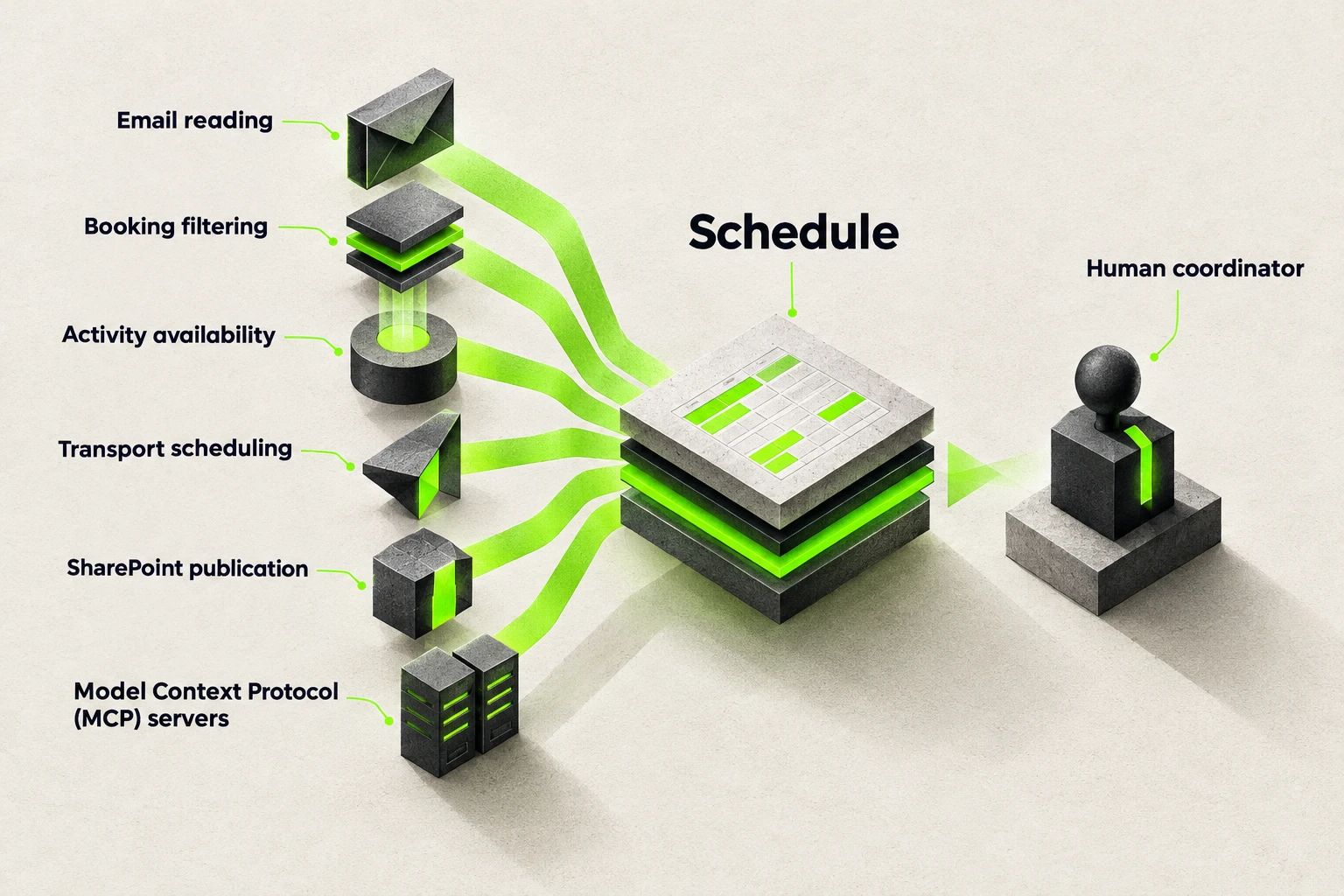
Connected scheduling tasks assemble under a human coordinator’s supervision.
When bookings, change requests, and availability updates arrive via unstructured emails, a coordinator can spend hours every morning just building the daily operating plan. Decomposing that morning routine into specialized, connected steps lets one person supervise the entire schedule instead of typing every row by hand.
In a real-world agentic AI transition for small and medium-sized tourism enterprises (SMEs), a single engineer augmented by AI development tools worked with business stakeholders to transform manual daily planning and transport scheduling into multi-agent workflows, decomposing email reading, booking filtering, activity availability retrieval, transport scheduling, and SharePoint publication across specialized agents exposed via Model Context Protocol (MCP) servers so a human coordinator supervises and orchestrates execution [3].
Daily Operations Planning and Resource Scheduling Workflow
- Trigger and repeatable process: Customer bookings, schedule modifications, and supplier updates arrive across emails and booking portals ahead of the next operating window.
- Autonomous multi-step execution: An email reading component extracts booking details, a filtering component validates active reservations, an availability component checks resource capacity, and a scheduling component calculates route and fleet assignments to generate the master planning sheet [3].
- System integration: The specialized components communicate through standardized Model Context Protocol (MCP) servers and publish the compiled operational schedule directly to SharePoint [3].
- Human checkpoint: A human coordinator supervises the orchestration, resolves constraint conflicts, and approves the final schedule before dispatch [3].
Operational Guardrails for SMBs Covering GDPR Compliance, Avoiding Vendor Lock-In, and Human-in-the-Loop Design
Automating a multi-step process without operational guardrails trades manual workload for compliance and reliability risks. Evaluating AI-accelerated software development or custom workflow deployments requires three non-negotiable controls before you connect live business data.
Designing Active Human-in-the-Loop Checkpoints
Putting a human in the loop only works if the reviewer actually inspects the decision. If an interface floods a manager with fifty routine approvals an hour, they will click approve without reading. Ankura Consulting Group identifies three operational criteria for selecting workflows suited for agentic automation (High Manual Effort With Variable Outputs, Recurring Audit Findings and Control Gaps, and Handoff-Dense Processes) while warning that unless human-in-the-loop review gates are deliberately designed and instrumented to track override and escalation rates, reviewers drift into approving outputs by default [4].
- Approval checkpoints: Pause the workflow before any external email is sent, financial entry is posted, or CRM record is deleted.
- Exception-only routing: Let deterministic rules handle stable, low-risk items so humans only review ambiguous, high-value, or out-of-policy cases [2].
- Override tracking: Monitor how often your team edits or rejects the system's recommendations to catch rubber-stamping early [4].
Protecting Data Under GDPR Compliance and Least-Privilege Access
Connecting an LLM-powered workflow to your CRM or accounting software does not mean exposing your entire customer database.
- Pilot-scoped data access: Prepare and connect only the specific fields required for the single workflow you are automating, rather than granting broad read-write access across every company folder.
- PII minimization: Strip or mask unnecessary personal identifiers before passing unstructured text to external language models, and ensure data processing agreements cover your region's GDPR requirements.
- Role-based permissions: Restrict the workflow's system credentials so it can stage drafts and recommendations without holding administrative rights to finalize transactions.
Preventing Vendor Lock-In With Open Standards
Hardcoding your business logic inside a closed, proprietary automation tool makes switching costs painful when models or pricing change.
- Standardized tool interfaces: Expose your internal data sources and tools using open standards such as Model Context Protocol (MCP) servers, allowing you to swap underlying models without rebuilding your CRM or ERP integrations [3].
- Modular step separation: Keep your business rules, prompt instructions, and system connectors separated so a change in your help-desk or accounting software only requires updating one connector.
How to Select Your First High-ROI Repeatable Process to Automate
Automating a broken, undocumented process only produces bad outputs faster. Before you build or buy a workflow, walk your candidate processes through this four-step operational filter this week:
- Score the process against three selection criteria: Look for workflows characterized by high manual effort with variable outputs, recurring audit findings and control gaps, or handoff-dense processes that cross multiple tools or roles [4].
- Map the composite boundary: Confirm the workflow spans multiple steps where context is currently lost during manual copy-pasting, rather than a single-step task that a basic software rule can handle [1].
- Redesign the steps before automating: Strip out redundant sign-offs and clarify the exact rules for what counts as a routine case versus an exception before introducing any AI components.
- Define the human approval gate and ROI baseline: Measure how many hours your team currently spends on the process each week, set the exact threshold where the workflow must pause for human approval, and prepare only the data needed for that first pilot.
Frequently Asked Questions
Do we need to clean up all our company data before launching an agentic workflow?
No, you only need consistent data prepared for the single pilot workflow you choose to run first. At advisory firm BPM, Data Analytics Manager Alan Cecil and Senior Manager Kristen Oshiro explain that organizations do not need perfect enterprise-wide data before starting, only consistent data prepared for a focused pilot workflow, and that governance controls such as dollar thresholds, access restrictions, and approval workflows allow an AI agent to prepare a journal entry or draft a follow-up email while requiring a human to approve and post or send it [5]. Pick one repeatable process, clean the specific fields that workflow reads, and leave unrelated legacy records for later.
How do we prevent an autonomous workflow from making unauthorized financial or customer changes?
You prevent unauthorized actions by placing mandatory approval checkpoints and review loops directly in the execution path. In the Human-in-the-Loop (HITL) agentic design pattern, Approval Checkpoints require the agent to pause for human confirmation before executing high-impact actions such as financial transactions or data deletions, while Review Loops use a human or secondary supervisor model to evaluate the agent's output before the process concludes [6]. Combine these checkpoints with strict system permissions so the workflow can only stage drafts in your CRM or accounting tool until a team member approves them [5].
How should work be divided between rule-based automation, AI agents, and human team members?
Divide your workflow steps by matching the stability and risk of each task to the right handler through structured interaction patterns. Marlon Dumas, Fredrik Milani, and David Chapela-Campa classify agentic business process execution into four interaction patterns between humans, rule-based systems, and AI agents: the Triage Pattern (dynamically routing simple inquiries to AI agents, moderately complex predefined issues like billing disputes to rule-based systems, and sensitive complaints to humans), the Human-Assisted Agent Pattern (where an agent performs the primary analysis and recommendation while a human validates and approves before execution), the Agent-Assisted Human Pattern, and the Verification Pattern [7]. Use this structure to let rules handle fixed calculations, agents assemble variable context, and humans sign off on sensitive decisions.
Sources:
- Deloitte Insights - 2025 Emerging Technology Trends survey data and Dell and Mapfre interviews
- FTI Consulting - Assessment of 57 workflow software providers and hybrid workflow allocation
- Bandara et al. / arXiv - Empirical study on multi-agent workflows in small and medium-sized tourism enterprises
- Ankura Consulting Group / Legal 500 - Operational selection criteria and human-in-the-loop review gate design
- BPM LLP - Pilot data preparation and accounting governance controls for business workflows
- AIMultiple - Human-in-the-Loop Approval Checkpoints and Review Loops design patterns
- University of Tartu / arXiv - Agentic Business Process Management Systems execution and triage patterns